
Google Ads low conversion rate: a systematic fix list
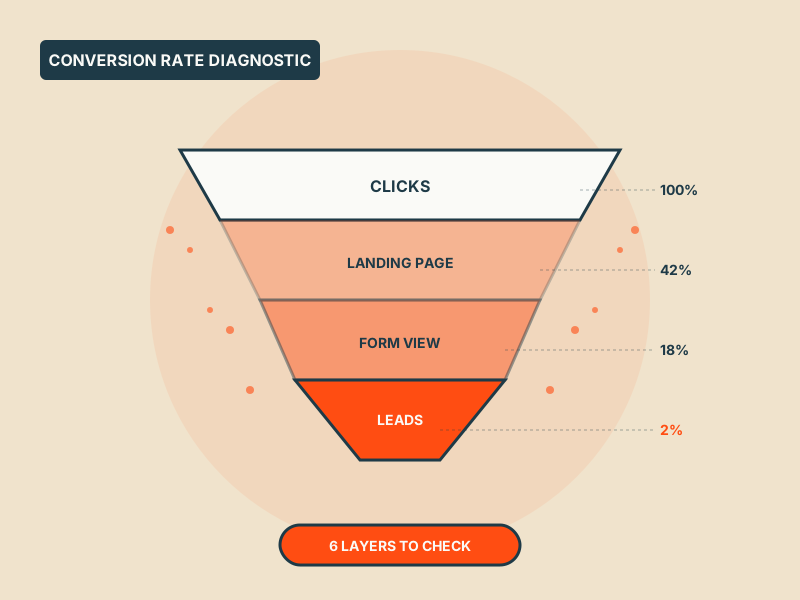
Conversion rate is an effect, not a cause. Walk backwards from the number through the six layers that actually move it, bid strategy, audience match, ad-to-landing coherence, and three more.
"Our Google Ads conversion rate is too low" is a symptom, not a problem. Conversion rate is what falls out of the bottom of six upstream decisions, bid strategy, audience match, query quality, ad copy, landing page, and what you're counting as a conversion in the first place. Fix conversion rate directly and you're squeezing a balloon. Fix the six upstream layers and the rate moves on its own.
Here's the diagnostic sequence we run on accounts where the conversion rate is the stated problem.
Layer 1: Are you counting the right thing?
Before blaming the ads or the landing page, look at what "conversion" means in the account. In half the audits we run, the conversion action is doing one of three things that breaks the entire downstream logic:
- Counting a low-intent event (newsletter sign-up, PDF download, video play) alongside real leads, with no weighting
- Double-counting, both a form submission and a thank-you page view fire as separate conversions
- Counting zero-dollar events for an e-commerce account (add-to-cart, checkout-started) without distinguishing them from purchases
If any of those is true, your "conversion rate" is telling you nothing useful. Clean the conversion schema first. One primary conversion per campaign goal, and everything else demoted to Secondary (they still get measured but don't drive bidding).
Layer 2: Bid strategy matched to volume
Smart bidding needs conversion data to learn. Under 15 conversions a month on a campaign and Target CPA or Target ROAS will thrash, bidding high one week, disappearing the next, never settling. You'll see conversion rate swing wildly and blame the ads.
If volume is low:
- Switch to Maximise Conversions with no target (let it find the curve first)
- Broaden the conversion definition temporarily to get the algorithm data (e.g. include a strong qualifying event like "quote request" alongside closed sales)
- Consolidate campaigns if you've split too many ways, two campaigns each doing 10 conversions a month both starve; one doing 20 can actually learn
Only move back to Target CPA/ROAS when the campaign is doing 30+ conversions a month on rolling 30-day basis.
Layer 3: Match type and query quality
Go to the Search Terms report. Sort by spend. Then look at what proportion of the spend is going to queries that should, in principle, convert, versus queries where even a perfect landing page wouldn't save them.
If 30%+ of spend is going to queries where intent is clearly off, your conversion rate is low because the traffic is bad, not the conversion flow. The fix is upstream: tighten match types, add negatives, restructure ad groups around converting intent.
A common version of this leak: broad match is pulling in research-stage queries ("how does [thing] work", "what is [thing]") for an account that only monetises transactional intent ("buy [thing]", "[thing] pricing"). The researchers click, don't convert, drag the rate down.
Layer 4: Ad–landing page coherence
The click happens on an ad. The conversion happens on a landing page. The rate drops whenever the promise made in the ad doesn't match what the visitor finds on the page, even if both the ad and the page are individually fine.
Common versions:
- Ad headline says "Free audit in 48 hours", landing page leads with "Our services"
- Ad mentions a specific product (PMax vs Search guide), landing page is a generic blog home
- Ad offers a price anchor ("from £499/mo"), landing page makes the visitor request a quote before seeing any price
Test this directly: for each of your top 5 ad groups by spend, click through from Preview & Diagnosis and ask "would I, having just been promised the thing in the ad, find that thing in the first viewport of the page?" If no, that's the drop-off, not the ad itself.
Layer 5: Landing page load, clarity, form friction
With ad–page coherence holding, the remaining landing-page issues are three:
Load speed. Every additional second of load time costs measurable conversion rate. On mobile especially, 3-second+ loads will wipe out 20–30% of clicks before they even see the page. Run the top landing page through PageSpeed Insights. If mobile score is under 50, you have a speed problem bigger than your ad problem.
Above-the-fold clarity. The first screen needs to answer: who is this for, what is the offer, what do I do next. If any of those takes scrolling to find, you're losing conversions to "I'm not sure what this is" abandonment.
Form friction. How many fields is the form? What fields are required? Is it a one-step submit, or a multi-step with a summary? Every non-essential required field costs conversions. Name, email, company, phone, message is five fields, you probably only need two of them required, the others optional.
If you're a service business with a "contact us" form that has six required fields, your conversion rate is capped by the form regardless of what the ads do.
Layer 6: Audience and offer–market fit
Sometimes the conversion rate is low because the offer doesn't fit the market at that price point, regardless of ad quality. This is the hardest one for a Google Ads manager to fix, because it's not a Google Ads problem, it's a commercial one.
Signs you're in this layer:
- Conversion rate is low across all campaigns (not one specific structure)
- Quality score is reasonable (above 5) across most keywords
- Bounce rate on the landing page is under 60%
- But the form just doesn't get filled out
At this point the diagnosis stops being "fix the ads" and starts being "is the offer clearly more attractive than alternatives, at the price we're charging, to the audience the ads are reaching". If not, no amount of ad work fixes it. Common fixes: stronger offer (free audit, trial, money-back), lower-friction first step (calendar booking vs form), clearer differentiation vs named competitors.
The working order
In our audits we always run the layers in this order, because each one exposes the next:
1. Conversion definition (15 minutes), makes every downstream number meaningful 2. Bid strategy match to volume (20 minutes), stops the algorithm thrashing 3. Search terms and negatives (1–2 hours), fixes traffic quality 4. Ad–landing coherence (30 minutes per ad group), fixes intent–page match 5. Landing page speed, clarity, form (1–2 days of work), fixes on-page conversion 6. Offer/market (ongoing), only relevant once the other five are clean
Most accounts we see have problems in at least three of these layers simultaneously. Fixing one without the others shifts the bottleneck rather than removing it. The rate only moves meaningfully when the three or four binding constraints all get loosened.
If this is you
If your Google Ads conversion rate has been sliding for 60 days or longer and the explanations aren't adding up, an external audit walks each layer against your account specifically. Book a free Google Ads audit, we'll send back a layer-by-layer report on what's binding the rate and what to do next. One document, no pitch.
Get a free PPC audit from the team that wrote this.
We'll review your Google Ads or Microsoft Ads account and show you three specific things we'd change in the first 30 days.