
How to improve Google Ads performance without raising the budget
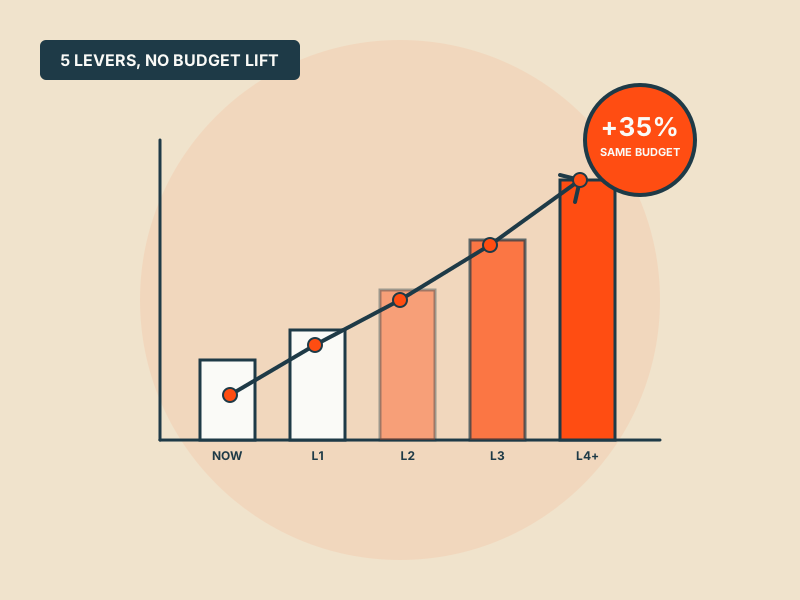
Almost every "we need to raise the budget" conversation should start with "what's the current budget actually doing". Five levers that improve output from the spend you already have.
The default answer to "how do we improve Google Ads performance" is usually "spend more". It's also usually wrong. Most accounts we audit are running at 60–70% of the efficiency they could be running at, meaning the same budget would produce 30–50% more conversions if the structural issues got fixed first.
Raising budget on top of structural inefficiency just buys more of what isn't working. These five levers improve the output of the spend you already have. None of them require a budget increase. Most of them take less than a week.
Lever 1: Shift spend from losing queries to winning ones
The Search Terms report is the most underused tool in Google Ads. Every account has queries that are converting well and queries that are burning spend. Nothing shifts spend between the two automatically.
What to do this week:
- Pull the last 90 days of search terms, sort by spend descending, filter to conversions less than 1
- Add those queries as negative keywords
- Take the top 20 converting search terms and check if they have their own keywords in your account; if not, add them as exact-match keywords in the right ad group
In one audit last month we found £3,200 of quarterly spend going to 47 search terms with zero conversions, each one spending between £40 and £150. Cutting them freed 11% of the budget to push into the converting segment. No budget change needed.
Lever 2: Move from last-click to data-driven attribution
Last-click gives all the credit for a conversion to the final ad interaction. Data-driven attribution (DDA) distributes the credit across the full journey using Google's actual conversion data from your account.
Why this lever changes performance without a budget increase: once DDA is on, the algorithm sees which keywords and campaigns were actually contributing to conversions even when they didn't get the final click. Bidding adjusts accordingly. Campaigns that were getting strangled because they never "closed" start getting fair credit and stop being cut.
For accounts that were previously killing their top-of-funnel campaigns under last-click, switching to DDA typically lifts total conversion volume 8–15% inside 4 weeks, same spend, better allocation.
One caveat: the first 2–3 weeks after switching look worse on any single-campaign view, because the credit is redistributing. Look at total account conversions, not per-campaign, in that window.
Lever 3: Tighten ad group structure
This is the unglamorous work and the biggest lever most accounts aren't pulling.
In a tightly-structured ad group:
- 5–15 keywords, all with the same user intent
- At least one responsive search ad where every headline and description matches that intent
- Landing page that directly answers the intent
Quality Score on a well-structured ad group typically sits at 7+. That translates to 20–40% lower CPC than a 5-Quality-Score equivalent bidding for the same query. Same budget, more clicks.
The work to get there:
- Audit your 20 biggest-spend ad groups
- For each, look at the Search Terms report, are the queries clustering into one intent, or three?
- If three, split into three ad groups, each with its own RSA matching that specific intent
We've had accounts where a single restructure of the top 15 ad groups (2 days of work) cut CPCs by 28% inside a month with no other changes.
Lever 4: Fix the conversion signal, then let smart bidding work
If you've done Layers 1–3 of the "low conversion rate" diagnosis (conversion definition, bid strategy matched to volume, search terms clean), smart bidding starts getting a clean signal. At that point, performance improvements happen automatically because the algorithm has what it needs.
Specific moves that clean the signal:
- Enhanced Conversions for Leads. Pass hashed email addresses and offline sale events back to Google Ads. Smart bidding now optimises toward real closed revenue rather than form submissions.
- [Conversion Value Rules](/blog/conversion-value-rules). Weight leads from target industries or sales segments higher than generic leads. If a lead from a 500-employee company is worth 5x a lead from a 5-person company, tell the algorithm.
- Primary vs Secondary conversions. Promote only the conversion that reflects real business value. Demote everything else to Secondary so they're still measured but don't drive bidding.
These three changes take a day of implementation work and typically improve campaign ROAS or CAC by 15–25% within 4–6 weeks as smart bidding re-optimises.
Lever 5: Pause campaigns running below the account average
Every account has some campaigns pulling their weight and some that aren't. The temptation, especially with older campaigns someone built 18 months ago, is to leave them running in case they're doing something useful.
What to do:
- Pull a 90-day report showing CPA (or ROAS) by campaign
- Calculate the account average
- Flag every campaign performing 40%+ worse than the account average
Don't pause them immediately. Check first whether they're serving a specific strategic purpose (brand protection, a specific product line, regional coverage). If no, or if they've been underperforming for 6+ months, pause them, reallocate the budget to the top performers, and watch account-level CPA drop.
This feels obvious and almost no account actually does it. We see accounts every quarter where 40% of budget is going to campaigns underperforming the account average. Cutting the tail frees budget to invest behind what's working, and the rest of the account performance improves with no incremental spend.
Order of work
If you do all five in a month, here's the sequence that compounds best:
- Week 1: Search terms cleanup and negative list (Lever 1). Fastest dollar-return work in Google Ads.
- Week 2: Attribution model switch to DDA (Lever 2). Needs 2–3 weeks to settle so start early.
- Week 3: Conversion signal fixes, Enhanced Conversions, Value Rules, Primary/Secondary (Lever 4). Let smart bidding use the better signal.
- Week 4: Ad group restructure (Lever 3). Deeper work, improves over 30-60 days.
- Ongoing: Quarterly performance review and tail-pausing (Lever 5).
After one pass through these five, most accounts see account-level efficiency improve 20–35% on the same budget. You don't need a raise; you need the machine to stop leaking.
When to bring in outside help
You've made some of these changes and the numbers didn't move the way you expected. Someone built the account 18 months ago and you're not sure what's currently configured and why. You're past the point where DIY YouTube videos are adding anything new.
Any of those and it's time for a proper second look. Book a free Google Ads audit, we'll run your account through this framework and send back a specific-to-you version of this list with numbers. No sales call required.
Get a free PPC audit from the team that wrote this.
We'll review your Google Ads or Microsoft Ads account and show you three specific things we'd change in the first 30 days.