
Google Tag Manager setup in London, what a proper implementation includes (and the shortcuts that break things)
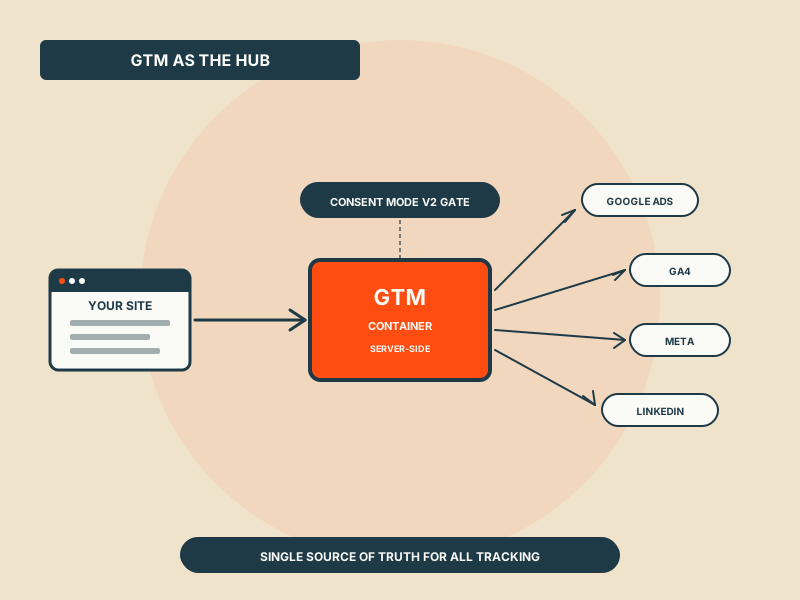
GTM looks easy. Done badly it breaks tracking for years before anyone notices. Done properly it becomes the single source of truth for everything you measure. The implementation choices that matter.
Google Tag Manager (GTM) is the single most leveraged piece of marketing infrastructure most businesses operate. Done well it gives you clean, consistent tracking across every paid channel, every analytics platform, every CRM integration. Done badly, which is most of the time, it silently corrupts the data your bid strategies, conversion value rules, and business decisions all rely on.
If you're hiring someone to set up or audit Google Tag Manager, particularly in London where compliance overlay (UK GDPR, ICO consent guidance) adds another layer, here's what a proper implementation actually includes, and the shortcuts that look harmless but cause downstream problems.
What GTM is actually for
GTM is a tag-management container that sits between your website and the various third-party tracking platforms (Google Ads, Meta Pixel, GA4, LinkedIn Insight, etc.). Instead of hard-coding each pixel into your site, you fire them from GTM based on rules you configure.
The benefits, when done properly:
- Single source of truth, all tracking lives in one place, easy to audit
- No-deploy changes, adding/changing tags doesn't need a developer
- Consistent event taxonomy, same conversion events fire to all platforms
- Consent management, one consent layer controls all tags
- Server-side option, for accuracy and privacy compliance (post-cookie deprecation)
The risks, when done badly:
- Silent breakage, a tag that stops firing produces zero error; you find out months later when bid strategies have drifted
- Double-counting, overlapping triggers fire conversions twice
- Privacy violations, tags firing before consent is obtained, ICO problem
- Performance degradation, too many tags slowing the site
- Lost institutional knowledge, the person who set it up leaves; nobody else can navigate the container
What a proper GTM implementation includes
Five components that most "GTM setup" engagements should cover:
1. Tag inventory and audit.
Before adding anything, document what's currently firing. Most existing GTM containers in 2026 have legacy tags from past tools, partial implementations, and unused triggers. Clean those out first.
A proper audit answers: which tags are firing, on which pages, under which conditions, sending data to which destination, and is each one still needed?
2. Event taxonomy.
Define the events that matter to your business and standardise their structure across all destinations. The events typically include:
- `page_view` (built-in)
- `form_submit`, `form_view`, `form_start`
- `cta_click` (with category/label parameters)
- `purchase` / `lead_qualified` / `[your business conversion]`
- `engagement_*` events (scroll, video play, etc.)
Each event should have consistent parameters (event name, category, label, value if applicable) sent to ALL destinations, Google Ads, GA4, Meta, etc., using the same names. This is unglamorous work and 80% of containers we audit don't have it consistent.
3. Consent layer integration.
For UK accounts, Consent Mode v2 is required for any tag that sets cookies or tracks users for advertising. The consent layer (CookieYes, OneTrust, Cookiebot, or Google's own consent banner) needs to be wired into GTM correctly:
- Tags blocked until ad-storage consent is granted
- GA4 tag uses Consent Mode v2 with redacted measurement before consent (not blocked entirely)
- Conversion modelling enabled in Google Ads to estimate non-consenting conversions
A common shortcut: blocking all tags entirely until consent. This breaks GA4 measurement modelling and makes Google Ads bid strategy worse than necessary. Proper Consent Mode v2 keeps modelling running while respecting consent.
4. Server-side tagging (server-side GTM).
Post-2024 cookie deprecation, server-side GTM has moved from "nice-to-have" to "required for serious accounts". Server-side gives you:
- Better conversion tracking accuracy (first-party context)
- Lower data loss from ad-blockers and ITP
- More control over what data leaves your domain
- Better UK GDPR posture (you control the data flow)
Setting this up properly takes 2-5 days of work plus ongoing maintenance. It's not a one-click toggle; it requires a server endpoint (Google Cloud Run, Stape, or self-hosted) and meaningful configuration.
5. Documentation and version control.
Every change to the container should have:
- A version note describing what changed and why
- A test record (was the tag verified to fire correctly?)
- An owner (who made the change)
GTM has built-in version history. Use it. Containers in 2026 should have meaningful version notes; most don't, and the institutional knowledge walks out when the implementer leaves.
The shortcuts that look harmless and aren't
Five common shortcuts we see in GTM containers we audit:
Shortcut 1: One generic conversion tag for "any contact form".
The setup: a single Google Ads conversion that fires whenever any form on the site is submitted.
The problem: lumps newsletter sign-ups, contact-us forms, and high-intent quote requests into one number. Smart bidding optimises to the cheapest of those (usually newsletter), not the highest-value (quote requests). Conversion Value Rules can't help if the events aren't separated.
The fix: separate conversion actions per form type, with explicit value differences.
Shortcut 2: Page-URL-based triggers instead of event-based.
The setup: triggers fire when a thank-you page URL loads. Easy to set up, no developer needed.
The problem: only works if the form actually navigates to a thank-you page. Modern forms (especially React/Vue/SPA-based) often don't reload. Conversion under-reports.
The fix: data-layer events fired by the form itself when submission is confirmed.
Shortcut 3: GA4 event configured but not sent to Google Ads.
The setup: GA4 receives the event; Google Ads doesn't. The implementer assumed the GA4-Google-Ads link would handle it.
The problem: GA4 conversion import to Google Ads is unreliable for real-time bidding. Smart bidding wants direct conversion signals. The GA4 path delays conversion data 24-48 hours.
The fix: native Google Ads conversion tags fired alongside GA4 events.
Shortcut 4: Tag firing without consent gate.
The setup: Meta Pixel, LinkedIn Insight, etc. firing on `All Pages` regardless of consent state.
The problem: ICO compliance failure under UK GDPR. Most consent banner systems will appear to block these, but only if wired correctly into GTM.
The fix: consent-status check in every tag's trigger condition; default Consent Mode v2 to denied until consent is given.
Shortcut 5: No environment separation.
The setup: one GTM container handling production, staging, and development.
The problem: testing in development sends events to production analytics, polluting the data. Or developers afraid of polluting production don't test, leading to broken tags in production.
The fix: GTM environments, Production, Staging, Development, with separate publish steps for each.
What's "London-specific" about GTM setup
Honestly, most GTM work is universal. The implementation differences for London-based businesses come down to:
UK GDPR compliance overlay. As described above, ICO consent guidance, Consent Mode v2, lawful basis for Customer Match.
UK regulatory categories. For FCA-regulated, gambling, healthcare, and crypto businesses, GTM events need to respect category-specific advertising rules (no remarketing of certain events, etc.).
London-specific senior tracking talent. The pool of GTM specialists deep enough to set up server-side tagging properly clusters in London (and partially Manchester / Edinburgh). Hiring outside London for this specific skill is harder.
Currency and tax handling on conversion values. UK accounts handling international revenue need GTM to pass values in a consistent currency to all destinations. VAT-inclusive vs exclusive matters for some platforms (Meta, Google).
What this kind of work costs
Rough UK pricing in 2026 for GTM work:
- GTM audit only: £800-2,500 for a 2-5 day review of an existing container
- Standard GTM setup (small site, basic events, client-side only): £1,500-4,000
- Comprehensive setup with server-side: £4,000-12,000 depending on complexity
- Ongoing GTM management (monthly retainer): £400-1,200/month
- Full marketing-tech-stack setup (GTM + GA4 + server endpoint + consent layer + integrations): £8,000-25,000
Below £800 for an audit, you're getting a 1-day surface-level review. Above £25,000 for setup, you're paying for marketing-leadership consulting wrapped around the GTM work.
Where we sit
Most accounts we run involve some level of GTM work, auditing existing setups, fixing tracking issues, implementing Conversion Value Rules and Enhanced Conversions, and increasingly setting up server-side tagging. We're not a GTM-only specialist, there are agencies in London who do nothing but tracking infrastructure (Measure Marketing, MeasureMatic, others). For accounts where the GTM work is the primary need, those specialists are often a better fit.
Where GTM work fits inside a paid-search engagement we're running, it's covered. For a free audit that includes GTM diagnosis, book a free audit, the audit identifies tracking issues alongside the campaign-side issues.
Get a free PPC audit from the team that wrote this.
We'll review your Google Ads or Microsoft Ads account and show you three specific things we'd change in the first 30 days.